



You’ve built a lovely WordPress site, your contact form looks the part, and the enquiries should be rolling in. Except… they’re not. Form submissions vanish into thin air, order confirmations never arrive and booking reminders end up gathering dust in someone’s spam folder.
If that sounds familiar, you’re not alone. WordPress email issues are one of the most common website headaches out there, and the good news is they’re usually a pretty simple fix.
At Blaze Media, we host and manage plenty of sites, and in this guide, we’ll explain why your WordPress site isn’t sending emails and how to get them landing safely in your customers’ inboxes.
Why Isn’t My WordPress Site Sending Emails?
Many servers don’t fully support sending email. Some limit how many emails can be sent each day, while others block the wp_mail function altogether. That’s why WordPress sites usually need an SMTP (Simple Mail Transfer Protocol) service set up to send emails reliably.
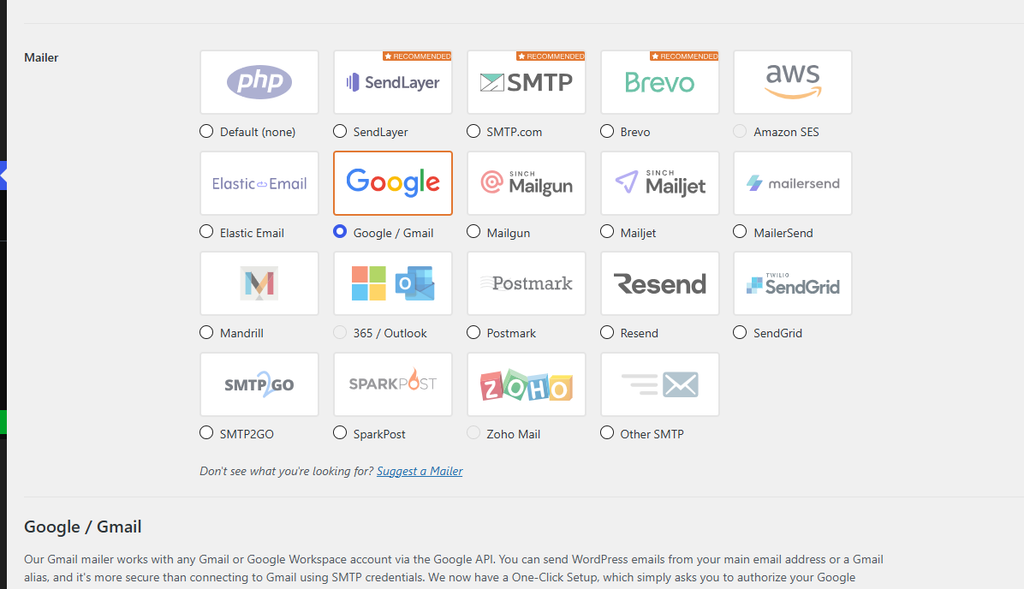
How to Fix WordPress Email Issues with an SMTP Plugin
The Best SMTP Plugins for WordPress
Some page builders and site templates, such as Elementor, have their own SMTP plugin to help make sure emails are sent properly from the site. The most widely used SMTP plugins are:
- WP Mail SMTP
- Easy WP SMTP
- FluentSMTP
- Post SMTP
Each of these lets you use a range of providers, from dedicated email platforms to services included in an existing hosting or email package.
How SMTP Plugins Work with WooCommerce, Amelia and Other Plugins
SMTP plugins work alongside any plugin that sends emails, not just contact forms, so ecommerce plugins like WooCommerce and booking platforms like Amelia benefit too. These plugins all call wp_mail, the function WordPress uses to send emails by default. An SMTP plugin hooks into that function, so the site can send emails without issues. Any email sent through wp_mail is redirected to the SMTP plugin, which passes it to your chosen provider to deliver to your website’s users.
Some plugins, such as Amelia, have several email sending options built in. Their settings will need changing to use wp_mail before an SMTP plugin can handle their emails.
Send All Website Email Content from One Professional Address
Another major benefit of an SMTP plugin is that you can choose one central email address for everything the site sends, which gives your website’s email content a more professional look. The emails are still generated by individual plugins, but they all appear to come from a single platform, so the site feels more cohesive. It also means companies can have one central inbox for replies, which makes responses faster and easier to manage.
This works best when the email address is hosted on the site’s own domain, as an Outlook or Gmail address is more likely to be rejected or sent to spam.
Set Up SPF, DKIM and DMARC to Stop WordPress Emails Going to Spam
What Are SPF, DKIM and DMARC Records?
Other common issues with WordPress emails come from SPF, DKIM and DMARC records not being set up on the domain.
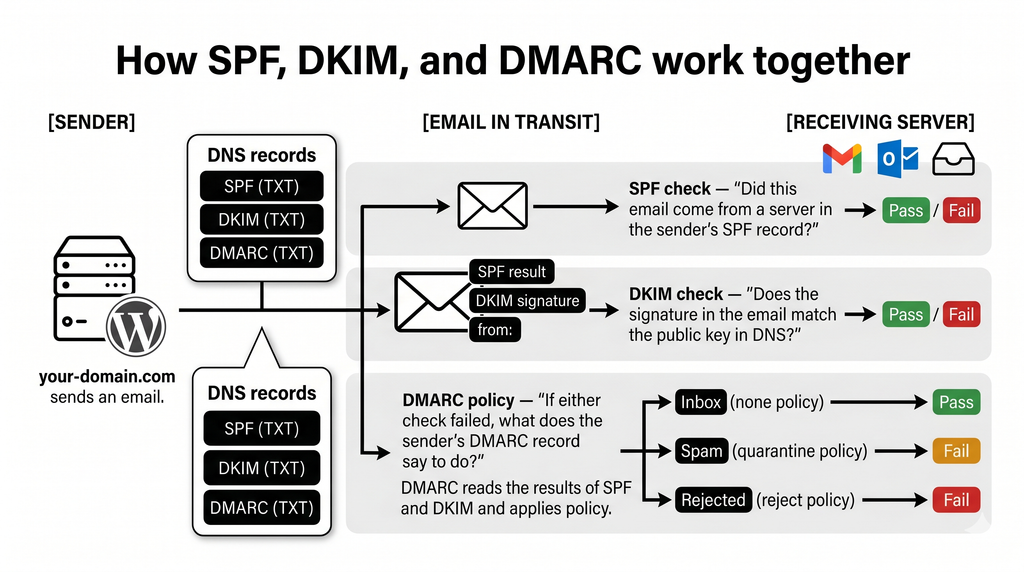
These are DNS records that email clients use to check that incoming emails have come from the correct sender, which helps stop spammers impersonating companies to steal personal information.
SPF and DKIM tell email clients that the email was sent by an authorised service, and DMARC tells them what to do with any emails that fail those checks.
Why Email Authentication Matters for Deliverability
Sites without these records can still send emails, and it may look like nothing is wrong. However, those emails are much more likely to land in junk or spam folders instead of the main inbox.
Google and Yahoo tightened their email security requirements in 2024, so some emails and email accounts without these records may be blocked completely.
Adding these records to your domain will greatly improve your email deliverability.
Need a Hand Fixing Your Failing Emails?
Email issues might not be the most glamorous part of running a website, but when enquiries and order confirmations go missing, they can cost you customers.
Setting up an SMTP plugin and adding SPF, DKIM and DMARC records to your domain will go a long way towards making sure your emails land exactly where they should.
If you’d rather leave the techy bits to someone else, our web design and development team is here to help.
Get in touch with Blaze Media today and let’s get your emails back on track.